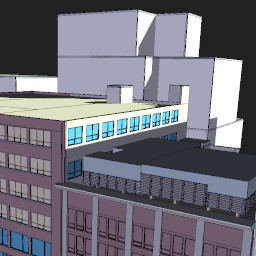
Yorik's site http://yorik.uncreated.net http://yorik.uncreated.net/favicon.ico http://yorik.uncreated.net/favicon.ico Updates on Yorik's site en-us Sun, 28 Feb 2010 15:16:02 +0000 3D cities http://yorik.uncreated.net/guestblog.php?2010=33 http://yorik.uncreated.net/guestblog.php?2010=33 Sun, 28 Feb 2010 15:16:02 +0000 Google Earth now has quite a lot of cities almost fully modeled and textured with their new >a href=http://sketchup.google.com/3dwh/buildingmaker.html>Building maker tool (which is VERY interesting but unfortunately only runs on windows). I put a couple of examples below for you to play the "which city is this?" game. Just pass your mouse on an image to see the answer... Blender 2.50 and 2.49 together http://yorik.uncreated.net/guestblog.php?2010=30 http://yorik.uncreated.net/guestblog.php?2010=30 Thu, 18 Feb 2010 20:05:43 +0000 A couple of days ago, the 2.49 scripts were removed from the blender trunk version (2.50). This means that when you install the 2.50 version, the 2.49 won't work fully anymore. But it is quite easy to make both work side by side: - The user settings aready use different files (.B.blend for 2.49 and .B25.blend for 2.50) so nothing to worry about - The scripts folders can be set to a custom path. What I do is to keep the standard .blender folder for 2.50 so it gets updated when I recompile (actually it is a link to the .blender folder inside my compilation folder), and I created a .blender24 folder, containing the old scripts. Then, in blender 2.49, set the script path to that one in the preferences, and the job is done! - You can then create two different links (or two different launch icons) to the two blender executables. If you are on linux, you can even create a "blender" link in your /home/user/bin folder pointing to the blender 2.50 executable, so it overrides your system-installed blender... Switching to blender 2.5 http://yorik.uncreated.net/guestblog.php?2010=23 http://yorik.uncreated.net/guestblog.php?2010=23 Wed, 03 Feb 2010 21:54:04 +0000 The new blender version 2.50 is now in sufficient good shape to be fully customized, and to me that was a very important point. So I swapped my main work version to the new one. Of course, since several functions are still not there (and specially almost all the python scripts), it's good to keep a 2.49 version around for a couple of months. I had a bit of trouble understanding how to change the default theme (You must go into the outliner, set it to display the user preferences, then navigate to the theme and replace the theme name "Blender" by another name, which will create a new - editable - theme. Other small thing was the middle mouse button that rotates the view instead of panning. Same thing here, you must export the default keymap, then change its name and reimport it, in order to create an editable keymap. Then, swap the view2d.pan and view3d.rotate values. I still cannot seem to export my new theme, but as soon as it works I'll post it around here... Lecture at the Campus Party 2010 http://yorik.uncreated.net/guestblog.php?2010=15 http://yorik.uncreated.net/guestblog.php?2010=15 Sun, 24 Jan 2010 14:47:05 +0000 for who'll be around, I'll be giving a lecture about blender and architecture at the Campus Party in são Paulo , on January 28th, at 16h00... Mountain office park animation http://yorik.uncreated.net/guestblog.php?2010=11 http://yorik.uncreated.net/guestblog.php?2010=11 Sun, 17 Jan 2010 20:00:29 +0000 Our latest blender work... dwg to dxf converter for linux http://yorik.uncreated.net/guestblog.php?2010=6 http://yorik.uncreated.net/guestblog.php?2010=6 Mon, 11 Jan 2010 16:22:11 +0000 This python application converts a dwg file to a dxf 2007 file with same name. To use it, you must have wine installed, and set the correct path to the EveryDWG utility by editing this script. The EveryDWG utility can be downloaded free of charge from the opendwg website but you must agree to their license terms before downloading. Instructions and download here. dxf thumbnailer for linux http://yorik.uncreated.net/guestblog.php?2010=5 http://yorik.uncreated.net/guestblog.php?2010=5 Mon, 11 Jan 2010 16:16:20 +0000 This application generates a 128x128px PNG image showing the contents of a DXF file. In order to speed up the image generation process, only a few types of entities are read, so complex files might not get rendered accurately or even fail to render. In order to use this program, you must configure your file manager to use it as a thumbnailer for dxf file type (mime type: image/x-dxf). Instructions and download here. Good free games on linux http://yorik.uncreated.net/guestblog.php?2010=2 http://yorik.uncreated.net/guestblog.php?2010=2 Tue, 05 Jan 2010 13:06:56 +0000 I decided to write this article to show a couple of games I like, that are free and run on linux. I am not trying to do a 10 best linux games article (Try searching for best linux games on google, you'll find many cool things), but rather to illustrate a couple of games that I like much, that are free and run on linux. The linux gaming scenery is evolving quite well now, aside the traditional open-source games, more and more commercial games are beginning to support the linux platform. But nothing like those good old free ones that are always around... 6 new tree textures on the textures page http://yorik.uncreated.net/guestblog.php?2009=332 http://yorik.uncreated.net/guestblog.php?2009=332 Thu, 24 Dec 2009 16:20:52 +0000 4 new plant textures http://yorik.uncreated.net/guestblog.php?2009=312 http://yorik.uncreated.net/guestblog.php?2009=312 Sat, 19 Dec 2009 19:25:42 +0000 Pick them on the textures page. Multi-events complex animation http://yorik.uncreated.net/guestblog.php?2009=307 http://yorik.uncreated.net/guestblog.php?2009=307 Tue, 08 Dec 2009 23:05:45 +0000 This is one of our latest animation. Enjoy watching! #idsampa04 : Uma rede de ciclovias para São Paulo http://yorik.uncreated.net/guestblog.php?2009=306 http://yorik.uncreated.net/guestblog.php?2009=306 Mon, 07 Dec 2009 14:18:47 +0000 Isto é uma tentativa minha de imaginar uma rede de ciclovias para São Paulo, aplicando a mesma filosofia de corredores ou linhas de metrô (ligar rapidamente e eficientemente pontos estratégicos), e tentando usar e reaproveitar pontos e infraestruturas que já são usados por ciclistas hoje em dia. Também tenta misturar trechos que ligam áreas de trabalho e áreas de lazer de maneira a ser usadas o tempo todo, e por tipos de ciclistas diferentes. Tentei usar ao máximo avenidas grandes, que já são eixos preferenciais, e onde instalar uma ciclovia seria mais fácil. É claro que isto é um trabalho muito incompleto. Mas tentei também manter a rede simples, como se o desenho tivesse que ser apresentado para alguma autoridade, e não podia assustar eles com um custo muito alto, nem apresentar algo muito complexo... O mapa que fiz aqui é público e editável por qualquer pessoa... Se você tiver outras idéias, porque não acrescenta-las? Acesse o mapa aqui. Two hand-made drawings of a country house project... http://yorik.uncreated.net/guestblog.php?2009=305 http://yorik.uncreated.net/guestblog.php?2009=305 Sun, 06 Dec 2009 16:49:15 +0000 Moonshake fluxbox theme http://yorik.uncreated.net/guestblog.php?2009=300 http://yorik.uncreated.net/guestblog.php?2009=300 Sun, 29 Nov 2009 16:07:22 +0000 This is a new fluxbox theme I just made. In the archive, there is also the .blend file I made for the background. Download it from here: http://yorikvanhavre.deviantart.com/art/moonshake-fluxbox-theme-145162287 Enjoy! Multiple sourcing in debian http://yorik.uncreated.net/guestblog.php?2009=298 http://yorik.uncreated.net/guestblog.php?2009=298 Tue, 24 Nov 2009 15:34:39 +0000 This is more a note for myself in case I need to do it again some time. You can use one specific version of debian, and add occasionally packages from another one. This might be very handy in case you are using the testing repository, because sometimes a package dependency breaks and the best way to solve it is to install the missing package from unstable. Keep in mind before trying this that debian versions are really made for what their name suggests, and if you want a system without problems, just stick to the stable version and don't try anything funny. On the other hand, if you are comfortable with linux and the debian packaging system, I find the testing version an excellent choice. Occasionally a package dependency breaks (usually bugs in the unstable version prevents a package to enter testing), and the package and its dependents get kept back by apt, so you must be very careful using apt-get dist-upgrade. If you can't wait for the bugs to be fixed and the package to land in testing, it is quite easy to add exceptionally some packages from other version. First, add the desired repository to your /etc/apt/sources.list file: deb http://ftp.br.debian.org/debian unstable main contrib non-free deb-src http://ftp.br.debian.org/debian unstable main contrib non-free Then, either add this to your /etc/apt/apt.conf.d/00defaultrelease file (create if necessary): APT::Default-Release "testing"; But this will simply mark the testing repository with higher prioritary, which means if a package is temporarily unavailable in testing, the unstalbe package will be installed, either add this to your /etc/apt/preferences.d/00Default (create if necessary): Package: * Pin: release a=testing Pin-Priority: 500 Package: * Pin: release o=Debian Pin-Priority: -10 This will give to the testing release a priority of 500 (the normal priority for your main repo), and any other official debian repository a priority of -10, which means: NEVER install from there. Then, to force-install a package from unstable, do: apt-get install packagename/unstable But be careful when that package pushes a lot of dependencies, because you'll begin to mix much different versions and it can give you headaches later. Better to keep this for emergencies, and with safe packages (that you know well, and that have few or no dependencies). #idsampa03 : taxis verdes http://yorik.uncreated.net/guestblog.php?2009=297 http://yorik.uncreated.net/guestblog.php?2009=297 Tue, 24 Nov 2009 00:08:10 +0000 Esta é do Sander. Uma ideia bem simples, que mudaria radicalmente a cara da cidade: Pintar todos os taxis em verde limão. Qualquer foto da cidade formaria, em vez da tradicional mistura de tons cinza, uma composição surpreendente. Imagine num dia de chuva? Ficaria chocante de tão colorido! Também ajudaria, talvez, a diminuir as pequenas infrações que os taxistas cometem diariamente, como avançar no sinal fechado ou em cima de passagem de pedestres, se fosse mais difícil passar despercebidos... 3 new wordpress plugins http://yorik.uncreated.net/guestblog.php?2009=294 http://yorik.uncreated.net/guestblog.php?2009=294 Fri, 20 Nov 2009 13:39:03 +0000 3 plugins that I made for the href=http://www.oteatromagico.mus.br/wordpress>o Teatro Mágico website are now available in the wordpress repository:href=http://wordpress.org/extend/plugins/image-feed-widget/>Image feed widget: a plugin to fetch thumbnails from rss feeds and display them in a widgethref=http://wordpress.org/extend/plugins/twitter-list-widget/>Twitter list widget: a plugin to merge the contents of several rss feeds and display them "twitter-like" (links, @someone and #something are turned into links)href=http://wordpress.org/extend/plugins/last-video-widget/>Last video widget: this one simply displays the last post of a given category in a sidebar, and resize its embedded video to the sidebar width. Fluxbox and pseudo-transparency http://yorik.uncreated.net/guestblog.php?2009=293 http://yorik.uncreated.net/guestblog.php?2009=293 Thu, 19 Nov 2009 16:57:51 +0000 Fluxbox is a window manager for linux and other unix-based systems, like KDE or Gnome (the default window manager in ubuntu). On a linux system, your desktop is made of a stack of different programs, basically the linux kernel, which drives your hardware, the X.org server, which is a graphical server and a window manager, which actually draws your desktop and its windows. More advanced window managers such as gnome are also called desktop managers because they do much more than just drawing windows. Like most pieces of a linux system, nothing prevents you from changing your window manager anytime. Fluxbox is an extremely simple window manager, based on the old and famousblackbox (which even has a version for windows). Several other window managers have evolved from blackbox, such as openbox. They all behave more or less the same and have the same qualities: they are extremely simple and fast. The big difference between fluxbox and the others is that it looks much cooler, because of two things: it can use bitmap images to draw icons and window borders, so you can draw almost everything yourself, and it supports pseusdo-transparency. Almost all recent linux distributions support openGL composition. That means that your desktop can do all kinds of cool effects such as having transparent windows or toolbars. This is done at a lower level by the X.org server, so basically anything can be made transparent (= composited) against the desktop background or other underlying windows. The problem is that this behaviour is pretty heavy on your graphic resources. Many people actually prefer to disable those desktop effects to have a faster desktop. And if you work with openGL-based 3D software such as blender or games, you will very probably encounter conflicts, bugs or slow performance and have to turn them off anyway. Pseudo-transparency is not real transparency. It is a trick, basically a portion of the background image, which lies exactly under a window, is copied and then applied to the window. You can do other operations with that portion of image, such as mixing it with a color, etc. Then, the contents of the window are drawn. You will have a perfect illusion of transparency. Of course, if you have several overlapping window, you won't see them all through the upper one. While this can be seen by many as a poor trick, to me it has fantastic advantages: It is all done by very basic software operations (copy an image, cut a portion of it, etc...), so basically any piece of software can do it, it doesn't use your 3D graphic board, and the fact that it is "false" transparency is actually very effective: How do you read the contents of a window if you can see the contents of the other windows beneath it? You need more effects, such as blurring the other windows, like windows vista does. More graphical resources used. The main use I do of my system is producing 3D content. I want all the power of my system available for rendering or displaying complex 3D scenes. The biggest advantage of linux is that it is possible. A Windows Vista system uses about 500Mb of your memory. A typical Gnome desktop uses about 300Mb. They all have a lot of resident programs to monitor things like network, user input, mounting/unmounting, etc. A fluxbox desktop can occupy less than 100Mb, and almost zero load of the graphic board. Applications start in fractions of seconds (no resident programs have to check for this or that), and, best of all, pseudo-transparency allows for totally cool desktop look... Another advantage of all blackbox-based window managers is the extreme simplicity of configuration. All the behavior of your desktop is stored in 2 or 3 text files, that you can either edit with a text editor or use specially-made configuration applications such as fbconf. The themes are also single text files, with an extremely easy syntax, like window.title.color = #FF3300. And on debian-based systems, the debian menu system takes care of updating your applications menu automatically. Fluxbox also has a couple of specific goodies, such as the ability to group windows different into one tabbed window. How to try It is very easy to have a look. Install the "fluxbox" package in your software repository, and next time you login, on your login screen, you will have a new fluxbox session available. You can have just a try, and come back to your default desktop by logging out/logging in again. Once you are in fluxbox, right-click anywhere on the desktop background to display the fluxbox menu, that contain about everything, your applications, styles (themes) and fluxbox configuration options. You also have per-window settings, available by right-clicking any window title bar. Fluxbox can remember several things for each applications, such as window position, level, etc. How to configure In your home directory, a ".fluxbox" folder will be created. Inside that folder, there is an init file that contains fluxbox general parameters. The contents of that file basically reflect what you can configure from the fluxbox menu itself. The second important file is the menu file, which contains all the contents of your fluxbox menu. If you are on a debian-based system, make sure it contains a "[include] (/etc/X11/fluxbox/fluxbox-menu)" line (or "[include] (/home/yorik/.fluxbox/fluxbox-menu)" for user-space version), so your menu will automatically show installed applications. You then have a keys that contains all keyboard shortcuts, and a couple of other files that usually don't need to be edited by hand (they are used for example to remember windows states). There is also a styles folder that contains all your user-installed custom styles (or themes). The two file types you will usually edit to customize your fluxbox desktop are the menu file and the style files. Both have a very complete man page: just type man fluxbox and man fluxstyle in a terminal. Transparency Fluxbox itself can apply pseudo-transparency to everything it draws: toolbar, window bars and menu. Simply right-click and browse the available options to set the transparency levels. Then, you have several terminals that support pseudo-transparency as well, such as aterm or urxvt (my favorite). You have then several excellent terminal applications (such as emacs or midnight commander) that, if run inside a pseudo-transparent terminal, will behave the same way. Finally, if you know a bit of coding, making your own pseudo-transparent application is quite easy too. Here is a pygtk code to produce a pseudo-transparent application such as in the screenshots above: import os, gtk class pseudoTransparentWindow: def __init__(self): self.toolbarheight=19 self.win = gtk.Window() self.win.set_size_request(250, 200) btn1 = gtk.Button("Test Button") fixed = gtk.Fixed() fixed.put(btn1, 20, 30) layout = gtk.ScrolledWindow() layout.set_policy(gtk.POLICY_NEVER,gtk.POLICY_AUTOMATIC) layout.add_with_viewport(fixed) layout.get_child().set_shadow_type(gtk.SHADOW_NONE) self.style(layout.get_child()) self.win.add(layout) self.win.show_all() self.updateBackground() self.win.connect('configure-event', self.updateBackground) def updateBackground(self,args=None,stuff=None): self.style(self.win) def style(self,widget): x,y = self.win.get_position() w,h = self.win.get_size() wpfile = open(os.path.expanduser('~') + os.sep + '.fluxbox/lastwallpaper') pb=gtk.gdk.pixbuf_new_from_file(wpfile.read().split('|')[1]) wpfile.close() crop = gtk.gdk.Pixbuf( gtk.gdk.COLORSPACE_RGB, False, 8, w, h ) pb.copy_area(x, y+self.toolbarheight, w, h, crop, 0, 0) mask = crop.copy() mask.fill(0x00000000) mask.composite(crop, 0, 0, w, h, 0, 0, 1, 1, gtk.gdk.INTERP_BILINEAR, 127) pm,m = crop.render_pixmap_and_mask(255) style = widget.get_style().copy() style.bg_pixmap[gtk.STATE_NORMAL] = pm widget.set_style(style) if __name__ == '__main__': pseudoTransparentWindow() gtk.main() O Teatro Mágico website http://yorik.uncreated.net/guestblog.php?2009=280 http://yorik.uncreated.net/guestblog.php?2009=280 Tue, 10 Nov 2009 20:47:53 +0000 This is the last website we made for the band O Teatro Mágico. It is mostly drawn by hand and made with wordpress and buddypress, with many home-made plugins... Enjoy! Golf Club animation http://yorik.uncreated.net/guestblog.php?2009=279 http://yorik.uncreated.net/guestblog.php?2009=279 Sat, 07 Nov 2009 20:00:49 +0000 Here is an animation we just finished. I'm not very happy of the google earth intro, but alas... As always, it's 100% blender. Enjoy!