homeservicesguestblog • last update: 01.01.2010 

YORIK’S COFFEE CORNER

This is our little café littéraire, a place dedicated to fine humour, delicate literary debate, talks of the finest quality, and plain gross stupid jokes. Aside from that, I also intend to put here interesting news from time to time. Be welcome and feel at home. Have a coffee and drop us a line or two. All languages are highly welcome, especially the most exotic ones (nederlands, bij voorbeeld...).

My last 5 bookmarks:
Bazaar in five minutes ? Bazaar v2.1.1dev documentationnews.architecture.sk - Modern Architecture & Design newsthunar-vcs-plugin4eateliers.tkHow to enable Multiple Pointers in X11

Friends blogs:
MaíraSantiGrégoireChicoEonAllanDalaiSérgio AmadeuCiceroMarianneMarielKazade

My last 5 tweets:
yorikvanhavre: YES!! Biking routes in Google maps http://maps.google.com/biking • yorikvanhavre: @stevenbjohnson the tramway http://miud.in/2jh and the alto de boa vista/tijuca forest http://miud.in/2ji • yorikvanhavre: cool article: 10 top addictive games on linux http://en.digitalkamera.com/top-10-addictive-games-on-linux/ • yorikvanhavre: on yorik's site: 3D cities http://bit.ly/avm6FU • yorikvanhavre: definition of yorik: a cultivating individual with a big booty. A rear end. http://www.urbandictionary.com/define.php?term=yorik


Already 27 messages in this blog, showing only last 20. Click here to show the last 50 or here to show all, or browse by tag: opensource - photo - works - 3d - animations - inthepress - or search the 2009, 2008, 2007 or 2006 archives.

First and foremost, your name:

And your message:

To publish it, just press this ...

permalink:  33   posted on 28.02.2010 16:16
From Yorik
3D cities

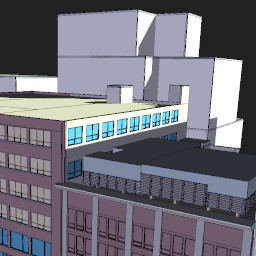
Google Earth now has quite a lot of cities almost fully modeled and textured with their new Building maker tool (which is VERY interesting but unfortunately only runs on windows). I put a couple of examples below for you to play the "which city is this?" game. Just pass your mouse on an image to see the answer...

Los Angeles

Tokyo

Zurich

Marseille

Athens

San Francisco

Copenhagen

Lyon

Madrid

Vienna

Veneza

Vancouver


permalink:  32   posted on 21.02.2010 3:50
From Yorik
Thanks!!


permalink:  31   posted on 20.02.2010 5:15
From Hello...
I just stopped by to pay you a compliment, I saw your Teatro Magico Buddy press theme on Deviant Art Website, and it is probably one of the most creative, visually stimulating that I have ever seen! Great job, I hope to see more of your work soon!


in categories  opensource  permalink:  30   posted on 18.02.2010 21:05
From Yorik
Blender 2.50 and 2.49 together

A couple of days ago, the 2.49 scripts were removed from the blender trunk version (2.50). This means that when you install the 2.50 version, the 2.49 won't work fully anymore. But it is quite easy to make both work side by side:

- The user settings aready use different files (.B.blend for 2.49 and .B25.blend for 2.50) so nothing to worry about
- The scripts folders can be set to a custom path. What I do is to keep the standard .blender folder for 2.50 so it gets updated when I recompile (actually it is a link to the .blender folder inside my compilation folder), and I created a .blender24 folder, containing the old scripts. Then, in blender 2.49, set the script path to that one in the preferences, and the job is done!
- You can then create two different links (or two different launch icons) to the two blender executables. If you are on linux, you can even create a "blender" link in your /home/user/bin folder pointing to the blender 2.50 executable, so it overrides your system-installed blender...


permalink:  29   posted on 08.02.2010 17:52
From Yorik
Hi dove,
I don't really know, but I guess it should be easy, try searching on the net for "blender second life" and you'll surely find much info. For example, this one looks good: http://www.masterprim.com/class/how-to-use-blender-create-second-life-sculpted-prim

Cheers
Yorik


permalink:  28   posted on 08.02.2010 17:19
From dove
Greetings Yorik. I'm just starting to learn about working in 3d and the tree making tutorial is very appreciated. I was wondering how the trees might be made into sculpties and exported into Second Life.


permalink:  26   posted on 08.02.2010 16:26
From Yorik
Note to self: for the record, the last 2 site layouts... I think I'll always keep a copy now, will be funny later.


permalink:  25   posted on 04.02.2010 17:28
From Dalai
Hey Yorik !
To change the theme you can also go to Blender User Preferences (Ctrl+Alt+U or change one of the editors to it) and click in the theme tab. I loved how the theme window is organized by the way (using the editor icons).

I'm also trying to migrate to 2.5 whenever possible. Saving constantly is still needed. Nevertheless scripting there is so much better than in 2.49 that I'm loving it.


permalink:  24   posted on 04.02.2010 17:28
From James Taylor
Thanks for posting your terrific looking work! We've had problems with Sketchup and are looking for an alternative. Your best words were at your conclusion: "since rarely, in the architecture field, your client or even your boss has the smallest idea of the time needed to mount complex scenes, not to talk about rendering times. This added to the marvelous habit of changing the project continuously." Truer words have not been spoken.
James
www.ibigroup.com


in categories  opensource  3d  permalink:  23   posted on 03.02.2010 22:54
From Yorik
Switching to blender 2.5


The new blender version 2.50 is now in sufficient good shape to be fully customized, and to me that was a very important point. So I swapped my main work version to the new one. Of course, since several functions are still not there (and specially almost all the python scripts), it's good to keep a 2.49 version around for a couple of months.

I had a bit of trouble understanding how to change the default theme (You must go into the outliner, set it to display the user preferences, then navigate to the theme and replace the theme name "Blender" by another name, which will create a new - editable - theme.

Other small thing was the middle mouse button that rotates the view instead of panning. Same thing here, you must export the default keymap, then change its name and reimport it, in order to create an editable keymap. Then, swap the view2d.pan and view3d.rotate values.

I still cannot seem to export my new theme, but as soon as it works I'll post it around here...


permalink:  18   posted on 25.01.2010 22:19
From Yorik
Hi Derek, in blender you can split and join windows, heve a look at http://wiki.blender.org/index.php/Doc:Manual/Interface/Window_system/Arranging_frames
It's very powerful, you can design your workspace as you like, decide where you want the buttons, etc. Hope it helps!


permalink:  17   posted on 25.01.2010 17:06
From Derek
Hi there Yorik - I am brand new to Blender and hope to use it in my CNC hobby - thanks for the theme downloads, they look great - a newbie question however, how does one get the lower button pane to display on the left of the screen as seen in your screenshots - many thanks and keep well


permalink:  16   posted on 25.01.2010 13:54
From david
It is too good!!! (sorry my bad english)


in categories  opensource  inthepress  permalink:  15   posted on 24.01.2010 15:47
From Yorik
Lecture at the Campus Party 2010


for who'll be around, I'll be giving a lecture about blender and architecture at the Campus Party in são Paulo , on January 28th, at 16h00...


permalink:  14   posted on 24.01.2010 15:44
From Yorik
Thanks guys! fi1222 your work is pretty amazing! I'll keep an eye on it, curious to see what you do with the plants!


permalink:  13   posted on 24.01.2010 9:54
From fi11222
Hi Yorik. The amount of material you have made available on this site is truly impressive. Thanks a lot for your efforts for the community.

I am no more than an amateur architect doing blender scenes for personal enjoyment. I have been working on a 1930s style religious building which I published on blender underground and for which I plan to use some of your vegetation resources. If you have time to give it a look, I would be very happy to know you opinion/advice.

Here is the link: [deleted because link forbidden ...] you can find it on blender underground forums, "WIP" section, thread "New Buildings".


permalink:  12   posted on 22.01.2010 22:03
From Brandon Mork
Hey! The foliage you've made is amazing, and I am currently in the process of making a Blender-Unity game. I don't know when it will or if it will be completed, but I was wondering if you would let me use your plants in it (Of course I would give you and your site all of the credits for anything I use of yours). You can E-mail me at nospam@hotmail.com, Thanks!


in categories  works  3d  animations  permalink:  11   posted on 17.01.2010 23:00
From Yorik
Mountain office park animation

Our latest blender work. Enjoy!


permalink:  10   posted on 11.01.2010 19:26
From Yorik
Hi Mohammad,
Well animating a car is pretty easy, since you don't need to deform it, so you don't need to use bones. There are two easy ways:
  • method 1: put your car somewhere. Press i (record keyframe), then select LocRotScale. Then, go 10 frames further. Move the car to a new position. Press i and LocRotScale again, etc, etc...

  • method 2: place your car somewhere. Create a Bezier curve. Edit the bezier curve so it represents the path your car must follow. Move the car to the start point of the curve. Parent the car to the bezier curve like this: select the car, shift-select the curve, then Ctrl+P, and select Follow Path.

After that you can play through your frames and see if the movement is good. If you used method 1, in the NLA editor you can move or delete your keyframes.
Hope it helps!
Cheers
Yorik


permalink:  8   posted on 11.01.2010 17:46
From Mohammad Talba Ahmad
Hi;Can you please describe me how to animate car movement in Blender.Thanks.